
Year: 2012
Top Windows 8 Shortcuts
1. Run any Program
To run any windows program, just type the name of the program when the start menu is displayed. This will open the search box and you’ll get hints as to which programs to open.
2. Get access to the old ‘Start’ type menu
Press Windows + X and you’ll see a small context menu that has shortcuts to lots of useful windows features, such as a command prompt, control panel, event viewer, disk management and lots more.
3. Print Screen
Pressing Windows + Print Screen will save an image in the ScreenShots folder in your Pictures library. Much nicer than having to paste it into Word or Paintbrush.
4. Charms
Press Windows + C to get the Charms bar (Search/Settings etc)
5. See what Apps are Running
Press Windows + Tab
6. Launch Explorer
Press Windows + E
7. Lock your PC
Press Windows + L
8. Share Something in an App
9. Move around the tiles on the Start Screen
Press Home/PgUp/PgDn/End/Cursors & launch apps (without a mouse or touch screen) by pressing Enter
10. Display the Settings menu of the current app
Windows + I
11. Open the Share menu for the current App
Press Windows + H
12. Activate Desktop Mode
Windows + D
Why do I need a Blog for my Business?
Blogging for your Business
Whenever we ask our customers if they want a blog, the usual response is “Whatever for?”. Most people have heard that having a blog is good for their website, but why?
Blogs are great ways of getting your views across, telling the world about your latest products, offers you may have, sharing your expertise and connecting with potential customers.
Getting a Blog
There’s two ways you can get a blog; by adding it to your current website or having a separate blog on a site like blogger, wordpress or one of the numerous free blogging sites listed here. If you’re looking to improve your site’s ranking through publishing blogs that are relevant to your business however, the best place for your blog is on your website – that way Google and Bing will find new content on your website every time you post a blog. That keeps the search engines coming back for more. It’s best to either publish the blog as a subfolder of your website (such as www.yoursite.com/blog/), but if you can’t do that the second best alternative is to set it up as a subdomain.
What do I put on my Blog?
If you’re stuck for content but you’re itching to publish your first blog to see how it will affect traffic to your site, a good place to start is Google Trends.
1. Go to Google Trends.
Type in the thing you’re most interested in (for us it has to be apps!) and Google will show you how many people have been searching for that term over time, where they are and what related search terms were used.
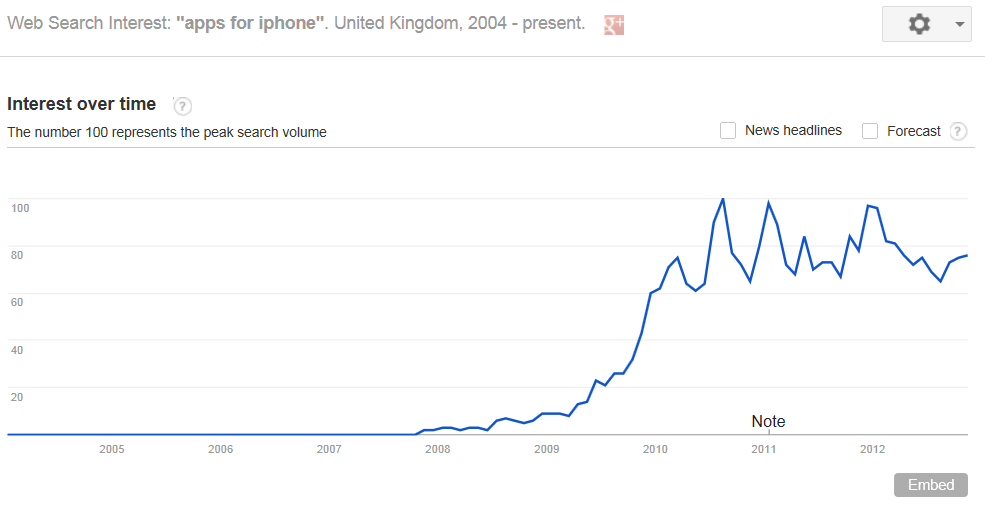
2. Pick your Region.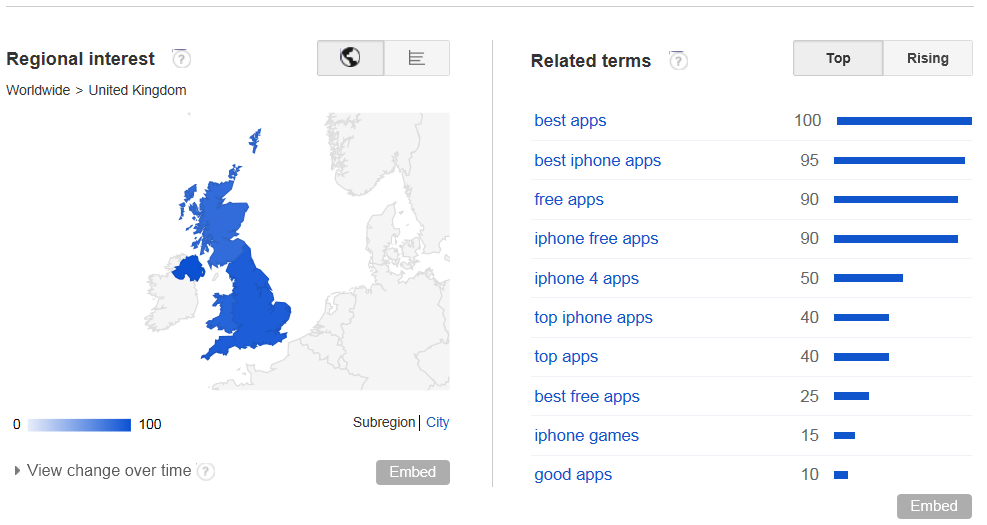
Because we’re based in Basingstoke, we’re going to choose the UK. You can drill down even lower, to England, then down to city level if you want to tell everyone in Oxford how good your sandwiches are for instance.
3. Pick any related terms that are better suited to what you want to blog about. It’s probably best to pick the higher search volumes (i.e. nearer 100). Once you’ve got a term you’re happy with it’s time to write your blog.
4. Start writing! Keep your blog article interesting enough to make sure people stay on the page and read it. If writing interesting content is a challenge, just write less words and include a video or infographic. The most important thing is that your readers stay on your page (and your website) long enough to see all the other great things you have to offer.
When writing your blog, make sure you follow these SEO basics:
- Make sure the Title of the blog includes the keywords you’re writing about and accurately describes what you’re talking about.
- Include a description (think of it as a 20 or 30 word summary of your blog article)
- Use headers and subheaders (H1, H2 & H3 in HTML). It’s always good practice to use these on all pages on your website. It helps the search engines categorise the content by order of importance.
- Link to other content on your website.
- Link to highly ranked websites. For instance we might want to link to Apple’s iTunes Store or Google Play.
- Most importantly, keep it down to earth and easy to read. The web is full of words so make sure yours are worth reading!
See your visitors increase
If you blog at least a few times a month, with relevant unique content, you’ll improve the frequency that search engines visit your site. The more search engines come back to get new content, the more visitors will find your content and ultimately your site will be ranked higher.
Ballmer: Windows 8 Phone isn’t going to be an instant hit
In a interview with LinkedIn’s Reid Hoffman, Microsoft’s Steve Ballmer described the position of Windows 8 against its Android and iPhone competition.
He described iPhone as being the top end of the market, with Android being at the bottom with it’s “wild” issues such as malware and compatibility. Windows 8 fits in there as the “personal” choice, allowing users to “only see the things that matter”.
He also stated that he didn’t expect the phone operating system to be an instant hit and that it had a lot of catching up to do. Currently Microsoft only have 2.4 percent of the smartphone market. Microsoft’s challenge is to gradually increase that market share and Ballmer said it wasn’t going to happen overnight.
One thing’s for sure, there is a need for an enterprise phone/tablet device and Microsoft is ideally placed with it’s position in the market due to it’s server technology and the defacto standard for desktop apps. Could that be the answer to increasing market share?
Creating a Windows 8 Development Environment
Setting up the Windows 8 Phone Development Environment
The Windows Phone 8 SDK has just been publicly released and there are higher than usual requirements for creating the development environment. From the official SDK page the requirements are listed as:
Hardware:
• 4 GB of free hard disk space
• 4 GB RAM
• 64-bit (x64) CPU
Operating systems: Windows 8, Windows 8 Pro (64 bit only)
Does your PC support SLAT?
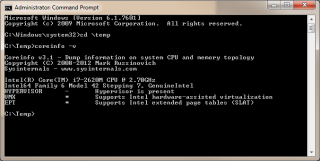 The Windows Phone 8 Emulator requires Windows 8 Pro edition or greater and a processor that supports Second Level Address Translation (SLAT)
How to find out if your PC supports SLAT The SysInternals CoreInfo utility can be used. Do the following:
Download CoreInfo, & run the following command to dump only the virtualization-related features.
(You’ll need to run the command as administrator)
coreinfo –v
If you have an Intel processor you need to look on the last line entitled EPT. If you see a star you are good to go, a dash or nothing – then new hardware will be required.
On AMD processors you are looking for the last line entitled NP. Again, a star means your PC supports SLAT, a dash or nothing = you won’t be able to run the emulator.
MalloDroid will help detect security problems on Android Mobile Phones
Some Android Apps Could Leak Private Data
According to a study released by researchers at the Leibniz University of Hanover, there are a fairly high percentage of Android apps available on Google Play that mean users details could be exposed because of poor coding practice when transferring data over TLS (Transport Level Security) and SSL (Secure Sockets Layer).
The researchers created a special tool called MalloDroid and when coupled with a fake Wi-Fi hotspot, they successfully managed to exploit 1,074 apps (8% of the apps available on Google Play) and were able to retreive personal details such as email accounts, social media logins and bank account details. In addition, they managed to execute code in order to make other apps behave differently and most worryingly they succeeded to alter requests to transfer funds and hide the changes from users.
The university will be releasing the MalloDroid web app very soon to allow Android users to check for themselves if an application exposes their private data.
After 2 weeks since launch, iOS 6 is on 60% of iPhones
Since it’s launch 2 weeks ago, iOS 6 is now on 60% of iPhones and over 45% of iPads (see the full results from Chitika here). Apple must be quite pleased with this result, since Android is lagging with only 22% of users being on the two most recent versions of it’s operating system. That’s an incredible acheivement to think that a complete OS upgrade has happened on so many devices in such a short time. The end result will mean more apps can be developed to take advantage of the new iOS 6 features, plus it should be good news for mobile advertisers.
BlueStacks allows Android apps to be compatible with Windows
Windows 7 & Windows 8 users will have a lot of choice of apps, with the latest deal between AMD and BlueStacks. The BlueStacks Virtual Machine will mean over 500,000 apps can now run on Windows, as long as it’s on an AMD processor.
Windows tablet devices will possibly end up having more Android apps than native Windows apps running on them.
This could be a massive bonus for the upcoming Microsoft Windows 8 tablets – It’s already available for Macs, we’re wondering how long before BlueStacks ports their emulator to iOS?
iOS6 is Here!
iOS6 is here and for the UK it offers some significant benefits to both end users and developers.
Major highlights of iOS6 include:
• Passbook – a cloud based ticketing system allowing users to download and use virtual tickets for concerts, trains etc which are also location aware and popup when you reach your destination
• FaceTime via 3G – dropping of the wifi only requirement that made it a gimmick rather than a serious contender to Skype etc
• Updated SIRI – supporting a wider range of features and better “outside US” support
• Facebook integration – in a very similar vein to iOS5x twitter integration
The main areas of contention are the loss of mapping functionality outside the US YouTube vanishing and lack of iPad v1 support.
The Google maps app has been replaced by the Apple version with data being supplied by TomTom. In the short term many countries have lost traffic and travel information and the quality of the satellite images is very seriously degraded outside of major cities. This problem will no doubt be addressed over time as Apple has the financial muscle to buy in the data it needs but the loss of YouTube and lack of original iPad support is bound to cause some pain for people.
On the plus side you can download upgraded version of YouTube now from the AppStore and Google Maps are still available via safari (or try maps.nokia.com)
3 times as many Apple Apps Developed than Android
Even though Android is the most popular operating system for smartphones, it’s still not as popular as Apple for new applications – and Android is getting less popular. According to Flurry, last year there were 3 Apple apps developed for every 2 Android Apps and this year it’s fallen to a 3:1 ratio in Apple’s favour.
This is possibly because it’s easier to create revenue from Apple apps and on average apps are quicker to develop for iOS.